This amazing USB stick has been a hot item of late. So hot, in fact, the last batch to go on sale (104) sold out in less than a minute.
It plugs into your computer (running Windows XP/Vista/7, OS X, and Kubuntu 10.10) and with the right program turns your computer into a software defined radio, capable of receiving whatever you want between 64MHz and 1.2GHz.
It's designed to be an educational tool for helping schools to pick up satellites using the dongle and a simple antenna. Hams around the world have been using them to receive voice/data/CW/whatever on all the bands from VHF on up.
Price is set currently at £125. Good luck picking one up. I've seen a Bag of Crap on Woot take slower time to sell out that these things.
If you missed out on the last run, there's one on eBay (ends Jan. 23) you can bid on, and as a bonus you get your callsign etched on FUNcube. Proceeds from the auction benefit the AMSAT-UK team.
You can check out this YouTube video of an "out-of-the-box" test listening to several AMSAT birds.
As I mentioned last week I got the Wouxun (pronounced "Oh-shing", close to the word "ocean") KG-UV2D handheld at the Morristown Hamfest last weekend. The radio is seeing a little bit of action, and needs some getting used to in order to properly operate it. After a week's worth of tinkering with it, here's my evaluation.
The KG-UV2D comes in 3 different versions, all using the same model number. On the 2 meter side, they all go from 136 MHz to 170 MHz. For the other band, there are three different frequency ranges. The one I have goes from 216-280 MHz covering the 1.25 (often referred to as "220") meter band. The others operate on the 70cm (often referred to as "440") band in 2 different ranges, one from 350-470 MHz, the other from 420-520 MHz. This review should cover most of what the 2m/440 radios have to offer as well concerning the functions of the radio.
Back to Basics!
First off, the relative simplicity of the radio is probably what will attract many hams (once they go past the super low price). Remember the Radio Shack HTX-202? That was a simple radio! Easy to use, clean keypad, not a lot of bells & whistles that some of today's HT's are overloaded with. It was a great first radio for may hams like myself, cutting their teeth in the post-apocalyptic no-code fallout back in the early 90's.
Don't get me wrong, it doesn't hurt to have too many gadgets on a radio to tinker with, but mess with the wrong setting, and you might have to do a hard reset of everything and start all over...
Wouxun was smart to not throw too much into these little radios. Put the essentials in (CTCSS/DCS tones, DTMF, Time-out timer, VOX) and throw in a few extras just to keep it interesting (FM radio, LED light, stopwatch, and alphanumeric memories).
RTFM (if you can)
One thing will be noticeable when you peruse the box and that is the owner's manual is not exactly, shall we say, proper use of the Queen's English...in fact, the "Engrish" is quite choppy at times. For example, the TOT function, what we call the "Time Out Timer", they dub it as the "Transmit Over Timer". There's quite a few others, but one thing I want to encourage is that, despite the rough translations, do not throw the manual away! It helped me figure out a few things I was doing wrong with the radio before getting on here shouting "this thing sucks" or something else...
I've talked with a few who went to the hamfest and got the radios (the 2/440 variety mainly) and a few were less than enthused with the radio. My first question to them was "did you read the manual?" and when they got done laughing, I reiterated "Seriously, read it!"
If you can overlook the grade-school-level translations of the Owner's Manual, reading the manual is not a large hurdle and you can get a better feel for this radio by reading it front-to-back. Right out of the box, you can figure out much of the functions with little confusion, but to get the full range of features, the manual is a must.
What happens in memory stays in memory
In one instance, I couldn't choose between high and low power via the keypad menu (more on that below). So if I wanted to shift from high to low, or vice versa, if I went through the menu options, and chose one or the other, the radio would beep three times, then reset back to the power setting it was on. As it turns out, I had to go to Menu 21 (the so-called "working mode") and set it to "FREQ" (a.k.a. VFO) before it would accept a change in power settings. If you are in the mode for the memories (CHFREQ, CH, or NAME) the power setting will not change. Whatever's plugged into the memory stays there.
Get your FREQ on
In "FREQ" mode you can direct-dial the frequency you want to listen to. You can scan to locate active frequencies if you are traveling. One of the things that is almost a must will be the need for the programming cable to quickly plug in frequencies that you plan to use. The cost will be around $20 give or take. I picked one up with the radio at the hamfest. You can program the radio manually, but the cable makes it easier by far.
Programming
While at the hamfest, I got a ham to go ahead and program my radio with whatever frequencies he had defaulted on his saved file. The software was easy to install (it runs off the executable, so no "install" necessary, just make sure you use the correct software for your operating system) and programming was not that complicated. It did not automatically shift the repeater inputs on the "TX Frequency[MHz]" column, so a knowledge of the repeater inputs (if applicable) is required.
Also note, if you program a frequency outside the transmitting range (such as NOAA weather radio on 162 MHz) leave the "TX Frequency[MHz]" column blank, otherwise you will get an error when trying to write to the radio. The error "Channel Message ## Out of range" appears, the "##" is the line number indicating which memory channel contains the invalid frequency.
The software also lets you program the TOT, frequency shift and offsets, the message you want to see when the radio is powered on, and several other features.
Selecting the COM port should be easy. On my computer, "COM3" was the only COM port available to choose. If your computer asks for more than one port, select the first one, and if the radio does not write, simply choose the "Communications Port" option and choose another COM port, then repeat until the radio upload commences. A progress bar across the bottom will move from left to right indication information is being written to the radio, and an LED light will blink on the radio.
The Good
I must say the light weight of the radio out of the box is nice. At just over 8 ounces you can almost forget you have it in your hand while walking.
I did have low audio on one repeater on 220MHz, but I determined it to be my location in the house, because when I moved to a different area (outside the house) my audio significantly increased.
I recorded myself using a local a couple of local repeaters here in Knoxville, one of which has 2 meters and 220 Mhz linked together, the other was a separate 2m repeater. The recording (which can be downloaded here, 39 seconds, 116kB MP3 file) is me first testing on the 2 meter repeater, then the 220 machine. I recorded off another radio plugged into the computer, so you will hear a buzzing noise which is NOT from my transmission, but from the radio with the carrier causing the noise. My 2m audio seems somewhat muffled on 2 meters as opposed to 220, which is why I tried it out on two different 2 meter machines.
I was told by a local ham about a mod on YouTube to increase the overall audio. I may give it a whirl soon with an update.
Voice prompts are a bonus as well. I like the feature of the voice telling me the battery voltage is low. It can also be fun to put it in Chinese to see what the different functions and channel numbers sound like.
The use of DCS and CTCSS is a good feature to have. Although I personally have not used DCS, some repeaters are employing this encode/decode method.
The dual receive on the same band is very helpful. You can monitor two 2m frequencies, two 220MHz frequencies, or one of each, or turn off the dual-receive and just monitor/use one channel. The FM radio feature also allows you to monitor your favorite repeater while listening to the local radio station of choice. Once the repeater keys up, it mutes the FM radio until the traffic has concluded.
The ability to store the FM broadcast radio frequencies into separate memory banks is also a bonus. I spent a majority of time listening to local radio stations while writing this article.
I've also programmed NOAA Weather radio into the memory so that I can take the HT with me to work and listen in if the weather gets bad.
The Bad
Just a personal preference for me, but I like a knob for adjusting the squelch. Having the radio determine the squelch via a menu setting can often lead to the radio becoming "deaf" when in the fringe areas of a repeater, or when trying to work a station on simplex. Perhaps an outside knob shielding the volume/power knob would be nice in a later version. You can temporarily kill the squelch by pressing and holding side key 2 (the lower button) but for me, I like to be able to use a physical knob to control the sensitivity of the receiver.
Next, the options for choosing high/low power, reverse (input), and repeater shift are options I would have preferred to be on the keypad or the side buttons. The menu process can be complicated just to change power level or choose a repeater shift. The lower side button (side key 2) only has two options, one for the monitoring (dropping squelch) of a frequency, or the built-in flashlight.
Side key 1 has four options to select from when programming the radio (FM radio, SOS help, scan, or lamp), so perhaps the side key 2 menu in a later model should be programmed to have the option of high/low power, reverse (input), and repeater shift. Better yet, I've always been keen on having the power button be it's own button, or a push-button switch like on the HTX-202's case. The important features (power, reverse, and repeater shift) should be a one-button function, or two steps using the "MENU" button first.
The VFO knob across the top got sticky on part of the turn when spinning it. It starts smooth (notching as you turn) and then it becomes increasingly harder to turn, as if it were tightening against something. Then as you continue to turn, the friction will ease up. I got some info (thanks, Rusty!) regarding the sticking tuning knob and was told that the plastic in the knob's base may have residue that makes turning the knob inconsistent with regards to the friction. I'm hesitant to crack the radio open right after I get it (and void that warranty!) so for now I'll live with it.
The stickers that ID the antennas (one for 216-239 MHz for the ham bands, the other antenna for 240-280MHz which is allocated for mobile, mobile satellite and fixed) are not held on very well. I simply took some scotch tape, cut it to the necessary width and length, and wrapped it around the labels to help keep them in place. See image to the left to see the scotch tape on the antenna's label.
Also, the "Wouxun" label on the front of the radio kept trying to peel off. A tiny swipe of super glue has resolved that problem.
The Ugly
The one thing I'm stumped on is why the need for a "Roger beep", and more importantly, why put it on the keypad and not something more useful such as repeater shift, MEM/VFO, or high/low power? Unless roger beeps are big in China, it's not useful here.
The owner's manual also needs to be "translated". After all we get these radios from a US distributor, so perhaps one should take the time to go through and clean it up?
The Rest
The KG-UV2D also features an "SOS" transmit for use in an emergency where it will sound an alarm for about 10 seconds and repeat this alarm approximately every 5 minutes. The SOS feature might be useful for foxhunting.
Here is a demo of the SOS feature I recorded:
It's best to use a programming cable when entering the memories you want for the radio. Using the keypad can take hours as opposed to just a few moments of programming the software, and just a few seconds of upload time to the radio.
The audio on the 2m side seems to need a tad more improvement, but, as shown by the audio recording, I was perfectly readable. Still, better audio quality makes for a better overall experience with any radio.
The Bottom Line
I do like this radio. On a scale of 1 to 10, I will give this radio somewhere between a 7 or 8. You will get your money's worth and then some with this radio. You can't beat the price of this radio, that's for sure! It's lightweight design will make it nice to carry around at a hamfest. When compared to other HT's, it's got enough features to compete, yet at the same time has a level of simplicity that makes it attractive to hams who might be intimidated by those HTs that have everything but the kitchen sink tossed in to the radio. It's not perfect, but then again, is there such as thing as a perfect radio? Some of the features a ham like myself would use more often should be easier to access, but once you get used to the radio, it should not be an obstacle. If you are looking for a good quality radio that will get you on the 1.25 meter band, this will suit your needs perfectly. If 220 is not active in your area, go with the 2m/440 version.
Wouxun is getting noticed with these radios, judging by the interest at the hamfest I attended. Perhaps this will open the market up for more 220 radios by the heavyweights like ICOM, Yaesu/Vertex and Kenwood, whose 220 product lines are all rather thin or even non-existent. It might get the competition to lower their prices on their current models (and/or future ones) in order to compete, not just the 220 market, but the 440 MHz dual-band radios as well. There are things that could be better on the radio overall, but this is certainly not a "knockoff" by any stretch, and does the job for those who may want a cost-effective means of getting on 220 or 440.
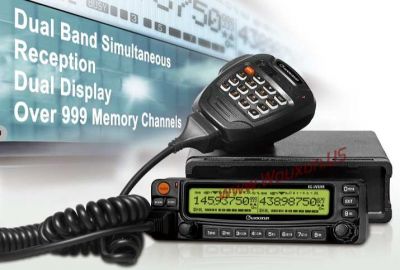
A visit to the Wouxun (pronounced "O-shing", close to the word "ocean") web site while checking out specs on my new KG-UV2D HT showed that they were taking reservations for people wanting to buy the 2m/440 dual-band mobile as soon as it's available.
You can put in for a reservation to have the chance to get in on the new radios once they are available, no obligation to buy once the price has been announced in case you don't like the price.
So how did I do on my previous year's resolutions?
Here's the scorecard:
I resolve to get Lauren an HT - Check- I bought a Yaesu FT-50R from a friend of mine for her about 3 months ago. That is one complicating radio! I may have to give her my Wouxun in order for her to use it without her head exploding.
I resolve that Amber will at least study to get her license, with Jes, Lauren and I helping. Hopefully it's before the Question Pool change on July 1. - Fail - As much as we tried to get Amber involved, time was not on our side, and the Question pool change back in July made the book I got for Lauren officially null and void. But we're not pressuring her to get her license.
I resolve to re-install a mobile in the minivan. - Moot - Our minivan's transmission died late in the summer and forced us to get a new vehicle, and Jes got an 09 Pontiac Vibe. I'll work on getting a mobile installed but it's a smaller vehicle and we'd need a small radio.
I resolve to talk with Lauren on the radio at least once/week on the way home from work. - Fail - Quite simply, a lot of things just didn't go her way or mine. I shoulder the blame for this, but sometimes getting her to talk on the radio is a chore in itself.
I resolve that I'll get Lauren and Jes on 10 meters (if the band will ever open up!). - Fail- 10 meters is just now starting to warm up, and so hopefully this will come to fruition in 2011.
I resolve to get a dipole antenna and string it up and get back on 40/80 meters. - Check - It needs a little work, but I am back on the low bands.
I resolve to contact at least 20 countries on HF. - Fail- Not much time spent on the low bands, but I did notch a couple of countries.
So the record is 2-4-1 for 2010. What are my resolutions for 2011? Not to make any more! Just go out and have fun, and whatever happens, happens.
Happy New Year! I hope that 2011 brings much happiness to everyone out there.
I started 2011 off on the right foot by attending the Morristown Hamfest, which was held on New Year's Day. It's been a long time since I attended this hamfest, probably 10 years since my last visit there, I can't remember.
The building was actually an arena/expo center, where monster truck rallies and an upcoming demolition derby are taking place. It had seating for approximately 3000 people and looked quite endearing to a possible arena football team (of course I looked at ways to put a slab of ice down and house a hockey team!). The concourse area above the seats was where the vendor tables were. There wasn't any tailgating due to thunderstorms running through the area all morning. Had the weather been perfect like the day before (calm winds, warmer temps, sunny skies) there would probably have been a larger crowd in attendance. As it was, there was still a pretty sizable turnout.
I had one primary purpose for going, and that was to pick up one of the new Wouxun (pronounced "O-shing", sorta like "ocean") 2m/220 radios if at all possible.
I met up with Tom (KE4WFJ) and we arrived just as the doors opened at 8AM.
The first vendor to the right of the entrance had a HUGE sign advertising $110 with a picture of the Wouxun radios. Music to my eyes!!!
A friend who had just arrived said that another vendor next to them had the radios as well so I ran to check their prices and they were $105! But, no 2/220 radios. I hurried back to the first vendor, and he had 1 220 radio left. "SOLD!" I yelled, and pulled out the wallet!
I also grabbed a programming cable and then cruised the hamfest for about 3 more hours (also attending a SKYWARN gathering) before calling it a day and coming home.
Well, the radio had to wait as I was exhausted from, shall we say..."over-celebration" of New Year's (don't worry, I was home, and my kids had friends over, so I didn't get sauced) and riding on 3 hours of sleep wasn't going to fly, so I crashed until late in the evening, then went to run an errand before getting home to really put the radio to the test.
The vendor who sold me the radio (DBJ Radio & Electronics) was extremely helpful in ensuring I knew what I was getting with this radio. They checked the antennas (this model KG-UV2D comes with 2 antennas, one tuned for the lower portion of the 23cm band [216-239 MHz] the other the higher portion [240-280]) to ensure the correct ones were labeled and also a card with their web site to download the software I would need for programming the radio. Then when I spoke with another tech who was at the same booth he ran and got me a coupler for the SMA antenna that the first tech forgot to include for use on an external or mobile antenna. Service, baby!!!
So, now that I have "quiet time" I got the radio out and played with it. I downloaded the software from the DBJ web site and installed it and found the programming relatively simple but tedious, still, better than trying to program the radio manually. Once I plugged all the frequencies in and saved the file I uploaded the file and it went through in less than 10 seconds.
The radio took a few seconds to reset to the new memory settings and then when I unplugged the cable the radio spoke to me (in English)!
I tested the radio out on 2 meters first by checking some of the local repeaters and keying up to see if I could hit them on 5 watts. Most of them worked, but being midnight, no one was on (or cared to come back to my call) but on one repeater (147.360) I was full-quiet into the machine, and I was some 30 miles from the repeater! The station said my audio was clean and no noise or distortion whatsoever. A great start!
So now I move over to 220 and there's no activity. I turn on my 220 base rig and key up a couple of repeaters, one of which has a slight delay, so when I keyed it with the Wouxun I had an echo that startled me for a moment, but I used it to judge my audio into the repeater, and it sounded just as good as on 2m.
So now, as I have only had about less than 3 hours of time to dedicate to my new toy, I have found the following out:
The good:
Lightweight - Compared to the Yaesu FT-50R I recently acquired from a friend of mine, it's much lighter. Almost half the weight. But the FT-50R's battery is bigger, 9.6V/11mAh compared to Wouxun's 7.4V 1300mAh.
Easy to use(so far) - it took about 10 minutes for me to figure out most of the functions on the radio on my initial go-over of it. Of course we *all* RTFM when we get a new radio, right??? It was definitely a lot simpler than some radios I've used to figure out what buttons do what.
2m/2m, 2m/220, 220/220 monitoring -If you want to listen to 2 frequencies on 2 meters, 220, or one of each, you can listen to whatever frequencies no matter the band.
Easy to program (with cable) - getting the software installed took a minute in part because I almost downloaded the wrong version of the software (my bad, I momentarily forgot I was on Windows 7 and the software is different for Vista/7 than for XP) but once I did download the correct version, I simply moved it to my desktop (no installation of software needed, it runs off the executable) and started using the software. I plugged the USB cable in and it found the driver (which I installed just before I downloaded the software as a precaution) and all I needed to do was select the COM port (easy since it was the only one highlighted) and started working the frequencies in that I wanted to program in to the radio.
Illuminated keypad - the keypad below the LCD display lights up with the display on pressing of a button or tuning the VFO knob. Very nice to have when in low light.
Voice prompt - it comes out of the box in English, with the option to have Chinese or no voice prompt at all. I had fun with the Chinese part, and it might come in handy to learn when visiting my favorite Chinese restaurant...
The bad:
Power setting not switching between high/low - It's 5W on 2 meters and 4W on 220 for high power, and 1W on low for both. Even though there is an option for high and low power, if you are on high power and select low, it negates the change and returns the setting to high. I can only assume this is a future enhancement. However, when programming via the software, it does enable the low power.
"Rotary Encoder" knob sticks - this may be just on my radio, but the so-called "Rotary Encoder" knob (VFO knob) has some variable force needed to turn at certain areas. While twisting the knob it was easy to turn, then started to stick more and more, then eased up. I'm not sure how to remedy this (other than returning it, which is not a big issue for me at this time).
Memory display slow to change - if you spin the rotary encoder/VFO knob and it clicks 3-4 times the memory display will only move up one channel. A faster processor might be in order for a future enhancement.
A roger beep? - Seriously??? You can set it to beep before a transmission, after, or both. I wonder how popular that would be?
Computer program can be tricky - When I started to program the frequencies in, the Receive frequency and the Transmit frequency default to the same. You'll have to know the correct input and output frequency of the repeater you want to talk on. Leave them the same for simplex ops.
Muting of other channel can be tricky - I'm still working with this, but be careful about your encode and decode of CTCSS when programming a toned repeater, or one that's occasionally toned. I had one repeater set in there to send and receive CTCSS tone, and right now the repeater has no tone to use. While in QSO with the 2m station, the other channel keyed on and gave a dead carrier and muted the ham I was in QSO with.
Again, this is straight out-of-the-box tinkering, so I'm sure I'll be able to find out more about what works and what doesn't over the next few days. I'm trying to see if the radio will scan like it's supposed to, or if there is VFO mode to search, something I'm not finding yet.
I did find the FM radio for the broadcast band between 88-108MHz, so I listened to some music while hammering out this post.
Overall, it's a good start. I need more time, but wanted to give a quick evaluation of the radio.
I'm an absolute geek when it comes to many things in Science Fiction. Although I can't tell you the parts list of a flux capacitor (other than it requires 1.21 jiggawatts, whatever the hell that is) or tell you the inner workings of a hyper-warp drive, I enjoy a good sci-fi flick if it stretches the imagination and makes you wonder if something is possible and plausible.
Then there's TRON.
Yeah, that's kinda how I looked when I saw the special effects for the first time.
I'm not the kind of geek that owns all the action figures of TRON, probably because I don't think there are any from the first movie (EDIT: There are!) or have posters of the movie or its stars on my walls (again, they didn't have any). But I have been a big fan of the movie from its groundbreaking special effects to its "shallow but campy" dialogue. Say what you will, I still use "it's got more bugs than a bait store" when the need arises.
TRON wasn't the kind of movie that got a lot of attention although it deserved way more credit than it got. Especially with the Oscars. In fact, it was disqualified from the "best visual effects" category because the Academy felt that the use of computers constituted "cheating". Really?
Not only that, but when it was released in 1982, a couple of other Sci-Fi flicks took a lot of TRON's thunder; Blade Runner and E.T. Both movies were groundbreaking in their own rights respectively. But special effects, to me at least, belonged solely to TRON for the use of computers and the imagination it created for an up-and-coming generation of geeks like me.
My geekdom comes mainly from the fact that:
I've seen the movie 80+ times, and
I played the arcade game so much, I'm pretty sure I shoved more quarters into the game than the GDP of seventeen 3rd world countries.
Considering some of the crap that has come out passing for movie reviews in recent years, I think I'm more than qualified than the others to properly review the sequel, TRON Legacy.
I've been waiting for this movie since the original trailer showed up online via YouTube when someone taped the then-called "TR2N" trailer at San Diego ComicCon a couple of years or so ago. So much so, I did a few firsts just for this movie, like buying tickets online about 6 weeks in advance, and watching it in IMAX 3D. I also purchased the soundtrack by Daft Punk, my first digital download of a music album. The only thing I didn't do was dress up like TRON Guy.
I will start off with 2 things, one, you won't find any real spoilers here (at least nothing too killer), and two, if you are a computer fan by any stretch, or a sci-fi fan in even the most trivial of degrees, you MUST GO SEE THIS MOVIE! Even if you've never seen the first TRON, there's enough of a back-story to fill you in on what's going on without having ever seen it.
The movie starts out in 1989, where we see Kevin Flynn (Jeff Bridges) telling his son Sam (Owen Best) a "bedtime story" about the Grid. The Grid is the digital world we eventually see later in the movie. He talks about how he makes for the "perfect world" scenario in the penultimate of virtual reality and talks about a "Miracle". As Sam asks about the "Miracle", Kevin tells him it will have to wait until next time. That next time never came, as Kevin Flynn went missing. Fast forward to the present day, and we see that Sam (now played by Garrett Hedlund) grows up to be a rebellious college dropout who has nifty computer skills, but doesn't care to be a part of the Encom empire like his father before him. He does, however, pay Encom a "visit" every so often to remind them of his father's legacy. And by "visit" I mean "break in and wreak some sort of havoc".
Bruce Boxleitner, who reprises his role of Dr. Alan Bradley, is now on the Board of Directors for Encom, and he pays Sam a visit after Sam stops by Encom Tower to pay them another one of his "visits" and tells Sam he received a message on his pager (yes, a pager). The page came from Flynn's Arcade, long since boarded up and all but abandoned, frozen in time 20 years. Sam goes to the arcade to explore the origins of the message sent to Alan's pager.
While in the arcade, we're treated to a heavy dose of retro, from the original TRON arcade game (which aided the original movie in a limited re-release towards recouping it's production costs that year doe to the games popularity) to Journey blasting over the sound system cranked to 11. The sounds of the games in that arcade will bring you back to the 80's all over again (those old enough to have been there) when a visit to the arcade was the alternative to doing homework or nothing being on TV, and the only video game systems were the original Nintendo and SEGA Genesis.
As Sam explores the arcade, he finds a hidden chamber behind the TRON video game, and it takes him to a room below the arcade that contains a tabletop touchscreen computer and laser, covered in dust, but powered on. Sam works to find out what his dad was doing the last time he used the computer and is prompted to activate the laser. He does, and the adventure begins, as Sam is taken into the Grid, a virtual world created by his father. Sam is forced into the games, where he meets up with CLU (played by a virtual Jeff Bridges) who momentarily tricks Sam into believing he's really Sam's father. Once he gets the information out of Sam, he confesses to Sam who he really is, and forces Sam to the light cycle game.
Sam is rescued by Quorra (played by Olivia Wilde) and she helps reunite Sam with his father. They then embark on a journey to get to the portal that will take Sam and Kevin back to the real world, dodging the nefarious CLU and his henchmen. In the beginning, CLU was partnered with Flynn and the original security program TRON, however, after a glitch in the Grid produced the so-called "Miracle", CLU, strict to his programming, turned on both Flynn and TRON and sought to return the system to it's "perfect state" by purging all of the imperfections. Flynn was not able to return to the real world and was trapped in the Grid, autonomous of the outside world and never connected to the internet, since the internet (as we know it) didn't come along until after Flynn's disappearance.
The special effects are just as groundbreaking as the original was nearly 30 years ago. One of the first things we are treated to in the Grid is the familiar "Recognizer", now upgraded and purely bad-ass. The light cycles, too, have been modified from their 2-D locomotion in the original to souped-up hot rods that streamline the rider atop it rather than enclose the rider inside of it (actually a limitation of the computer graphics in 1982 that prevented showing a rider on the light cycles, resulting in a geometric design that encased the rider). Although we are treated to a vintage light cycle, version 2.0 actually.
Several objects of affection in the original make their upgraded appearances in the movie, such as the Solar Sailer and the Transport Carrier, but no tanks are seen, which kinda sucked. What's also improved is the time it takes to get sucked into the Grid. Instead of 80 seconds for Flynn in the original, Sam was there in less than a second. We also don't see any grid bugs, which were prominent in the video game, but only warranted a cameo in the original movie. For the ones like me who were looking, you'll find many references to the first film in the movie. Some subtle, others not so much, but one thing I noticed absent was reference to the MCP.
Now for some of the bad things. First, as mentioned before, no tanks. Come ON...how could you not have them? Oh well, we'll give a pass, since the storyline more or less did not have much use for them. Still it would have been nice to see what one looked like in upgraded form. The story seems to slow down after Sam reunited with his father. The pace was fast and in a near-constant accelerated state up until then. Afterward, we see a significant slowdown but not necessarily anything stagnant.
If I have one real gripe, it was the mouth movements of the younger Kevin Flynn/CLU. It looks so artificial, almost like going to Disney World and seeing one of their animatronic robots, like in the Hall of Presidents. Yes, it's all CGI, but if you watched Forrest Gump, the mouth effects of the Presidents in Forrest Gump was more realistic. They should have incorporated some hand-drawn animation to perfect CLU's mouth to be more natural. But then again, he is a computer program, so maybe that was the whole point?
The plot overall was very good, although at times painfully predictable. Yet, it really made sense of why we haven't seen any action from the franchise for 28 years. In reality, the computer graphics needed to get to this point in the technology in order to produce an epic of this scale.
Garrett Hedlund did a nice job in the role of Kevin's son. Although I kind of felt young Sam (Owen) was a bit better in his brief appearance. I think there wasn't a lot of emotion from Hedlund when it needed to be there, but definitely much better than if Shia Labeouf were in the role. He'd talk Flynn's head off and after 30 seconds he'd shove him out the door...
Costuming for TRON Legacy was revolutionary, incorporating flexible lights and fabric together using techniques never-before tried. You can thank the folks at Quantum Creation FX for the design.
It was good to have TRON's director Steven Lisberger retained as Producer. TRON's Producer Donald Kushner also was retained for this film. In my opinion, if you're going to have a great sequel, you need to keep as many people as possible from the original film in order to keep the ideas and the stories consistent.
The history of TRON has been kind of a love-hate with the Disney gang. I'm not sure why but Disney never gave TRON the kind of push it gave to other movies it oversaw. It seems Herbie and the Apple Dumpling Gang got more love from Disney than TRON. Despite the groundbreaking effects, which Disney seems to enjoy pulling on folks (see Toy Story), there wasn't much hype to the original TRON that I recall back then. Then Disney shelved all of the already-scant publicity and advertising for the first movie soon after its disappointing release. In fact, my first exposure to TRON was an article in TIME magazine reviewing the movie (positively, I might add). Disney considers the movie to be the red-headed step-child of it's movie fleet in many respects. Contrast that to the marketing blitz we've been consumed with for TRON Legacy these last 12 months plus, and it's hard to believe that the first TRON is not really being marketed to those who might want to see what started it all.
My wife liked the first TRON better, but then again, I do too. How many sequels can recapture those initial feelings of euphoria you get when you see mind-blowing effects and incredible action for the very first time all over again?
The first thing I did when I got home was plug in TRON and watch it. Even on my HDTV there's a lot of letterbox space at the top and bottom. And even today there's a lot of things that still show up for the first time despite the fact I've seen it multiple times. There's a lot of people who still like the originals over their sequels, no matter how spectacular the remake or the sequel is. I offer Star Wars and the Matrix as examples.
For anyone who remembers the original movie, it will captivate you and put a lot of the original movie into a greater perspective. For those who have never seen the original, or who weren't as captivated by the movie as I was (like my mom and wife, who went to the movie with me and my brother) but did like the original, TRON Legacy will be worth the money and might make some sense of the TRON concept.
I was completely blown away by this movie. Then again, I am a fanboy. It's the perfect sequel for those who enjoyed the first movie.
So, if you've stayed with me to the bitter end, what's the bottom line? Quite simply, if you are a fan of any kind of computer, science fiction, fantasy flick, or of special FX in general, then this movie is a must-see. And it's best to see in 3D IMAX to take maximum advantage of the movie. I've already made plans to save my pennies and catch it again. The last movie I saw more than once? The Hunt for Red October (suck it, Trebek!!!).
And to the folks that get paid to tell you this stuff: TRON Legacy is not entirely about dialog, plot, or whatever other excuse you can pull to not like the movie. We're talking about a movie involving the computer world and the computer-generated special effects are what runs the movie. That is what people with even a passing interest in technology really want to see.
It's not uncommon for hams to hear themselves a second or two after they transmit on HF as their signal propagates around the world and then comes back on the "backside" of their antenna. It's even been reported that hams have heard their own voice come back 2, even 3 times.
But one ham in Germany recorded hearing his own CW transmissions an astonishing 46 seconds after sending them!
Ever wonder just what the ISS hears when they try to contact stations on the ground? Commander Doug Wheelock (KF5BOC) treats us to a glimpse of the amateur radio station on board the International Space Station as he makes a pass over North America just before he returned to earth last week after spending 161 days aboard the ISS.
In the 20 minute YouTube video Wheelock introduces us to the NA1SS "shack" as well as a few of the US and Russian segments of the station before beginning his QSOs.
Some of the stations he worked this particular pass:
N6RSX
KD0EXV
N0KGM
N0WAR
N6RSX (again)
KF7IO? (he missed the suffix)
W0PD
W5SSV
As you'll hear, it's quite a pileup of noise as dozens of stations struggle to make contact with Doug. At one point he switches to what he referred as "Channel 5" which is a simplex frequency alternate he used to relieve the pileup he was getting on the primary frequency used over North America. I checked with a couple of web sites but no reference to a simplex frequency is mentioned.
If anyone knows what the "simplex" is he was using please let me know.
Skip to 10:30 for the NA1SS station and laptop used for them to monitor their location. 11:40 for the radio power-up.
So remember, the next time you try to contact the ISS and they don't hear you, chances are you're not the only station trying to talk to them.
A ham radio operator in Peoria County has some residents outraged.
Craig Thompson is building several towers on his property and his neighbors are apparently concerned with the view once they have been erected:
Furthermore in the comments section, one neighbor has threatened to install an electric dog fence or resort to other means to impede the use of the towers.
The funny thing is, everything Mr. Thompson has done to this point has been legal, cleared by the county, and it's on his personal property. The county trustee even cited amateur radio's federal guidelines (PRB-1) that allow ham radio to supercede tower restrictions.
Fifteen people along the Eastern seaboard suffer retrograde amnesia after listening to their shortwave radios on the same frequency; the anticipation of Olivia's return escalates.
So tune in tonight on the Fox network if you can. You won't forget it...or will you?????
EDIT: I didn't check my email closely, it was sent LAST night (Thursday). Maybe it'll be on Hulu?
Okay, I'm a little slow sometimes, but apparently some site trying to play themselves off as being "funny" posted something that got picked up on my Google news alerts about a country singer/ex-pro wrestler named "Chad Brock".
I don't listen to country music but read this trying to figure out 1) was it real, and 2) where is the humor?
I found out the question to #1 when it was posted under "fake news" but still have yet to answer #2...