QRZ Logbook

        
Showing posts with label antenna. Show all posts

Tuesday, August 6, 2019

DIY HDTV antenna

I have begun a project to build an HDTV antenna using a 2x4, wire coat hangers, and nuts and bolts from wherever I can find in the house.

I'm scrounging around for copper wire (buying from the store is EXPENSIVE!) and hoping to have all the necessary parts later this week. 

Part of the project requires a BALUN for antenna impedance matching. 20 years ago they were a dime a dozen and everywhere. Now, not so much.

While the project calls for a metal screen on the back to act as a reflector, I'm not going to add one at this time. I want to see how this performs before tweaking it further.


Stay tuned! Get it???

Wednesday, June 10, 2015

Having a blast on Digital

ICOM 706 with Signalink USB for Digital
When I went to the Dayton Hamvention last month, one of the goals I set for myself was to try a new mode of communication. All my time as a ham (with the exception of APRS a few years ago) the majority has been on voice. I've dabbled in CW and PSK31 but typically on other people's equipment, and they were the operators.

I've not been able to do much in the last few years on other modes. The last 3 years I haven't had an HF antenna because we had hail damage to the roof from a thunderstorm a few months prior and when it came time to replace the roof I took the G5RV antenna down, and never put it back up. I wasn't impressed with this particular G5RV I had anyways. I've owned them before and had good success, but this particular one has been trouble. I couldn't get a good signal on 10 meters, and several of the bands were "tunable" but I wasn't getting out to places I should have been able to reach. I figured I would get a new dipole up SOMEDAY...

Last February I finally got a dipole. 20 meter double bazooka to be exact. I've heard mixed reviews but decided to try it out and see how good/bad it was. Well, I finally got it up after a few days but it wasn't in the most optimal spot. It was barely 15 feet above the ground and was hooked up to my 6m dipole's support wire, which caused it to sag. To add insult to injury, my luck on 20 meters was no where to be found. I figured I'd wasted my money.

Fast forward to last month, when Dayton rolled around. I invested in an off-center fed (OCF) Windom (often referred to as a "Carolina Windom") that covers 80 meters through 6 meters and also invest in a Signalink USB sound card. The Signalink connects between the computer and the radio and converts text to digital encoded signals that are then sent to the transceiver and out onto the airwaves. It is then picked up by the receiving station, to then decode the message and convert it back to readable text. Sort of like an ultra-slow-speed modem. The Signalink is simply an external sound card, but rather than try to rig up cables from your computer to the radio, the Signalink takes the leg work out of it, and is pretty much universal (given you use the same radio) to any computer.

About a week after I returned from Dayton, I put together the Signalink. All I had to do was open the case and rig up the jumper wires on the circuit board, which took about 10 minutes. Once I got it set up I then installed the drivers onto the computer, which took about 20 minutes due to the computer being an XP artifact. I installed DigiPan for use on PSK31 since it was highly recommended (and freeware) and after rebooting, and some trial and error I was able to get the computer to make my ICOM 706 transmit. I tuned up the double bazooka dipole and listened on 14.07015 for any incoming signals. Almost immediately my screen lit up with activity. 

DigiPan screenshot. "Waterfall" of signals at bottom.
The bottom of the screen shows a "waterfall" that is a visual representation of the signals coming in to the radio on that frequency. Imagine if you were to key up and use your voice on 14.07015 (and just so you know, you're not supposed to use voice on that frequency, only digital or morse code) your signal would take up the entire swath of the "waterfall" that's on the screen. With PSK31, several conversations (QSOs) can be conducted at the exact same time, and all you have to do is move your mouse pointer to the line on the waterfall that you want to look at, and the program will start to show you that specific conversation in a separate pane.

I began setting up my "macros" or pre-set messages, with my call, location, grid square, and other useful information. After a few minutes of hammering out my messages, I looked on the screen and found a station that I wanted to try contacting since their signal was pretty strong on my waterfall.One nice feature about the DigiPan is that when a CQ is called, it gets highlighted on the pane that shows all the detected QSO's going on, so that you can select the conversation you want to try and get involved with.

I replied to a CQ made by N5SLY in Sherman, TX. I wasn't sure if I should be jumping in to things rather quickly. I have used PSK31 before, at Field Day events and at a friend's house, but this was my first true test of communicating with my own equipment and I wondered if I was entering the wrong protocols, verbiage, information, etc. Was I going to get chewed out for typing out the wrong information? Was I typing fast enough? As I entered the deep end of the pool, I had second thoughts, but they were quickly removed after Leland replied back with a very nice QSO. 

Over the next 90 minutes I managed to get 4 other QSO's in the log books and found out quickly that the old paper log book is going the way of the dodo. Most everyone I was talking with, or seeing on PSK31 was using some means of electronic QSO confirming that didn't involve QSL cards. Call me old-fashioned, but the thrill of getting a postcard in the mail from another city, state, country, or continent makes me happier than something that appears on a computer screen I can print out anytime. Yes, it's less expensive, but the act of getting something physical in the mail is something I always preferred.

Over the next 3 weeks, I have managed to put together about 70 QSO's off and on when I have time for PSK31 including 25 countries. I then decided to up the ante and try PSK63. Basically PSK31 at double the speed, but with more susceptibility for errors. I managed to make 2 contacts so far, but it doesn't seem to have the allure of it's slower counterpart.

As I was exploring the capabilities of my Signalink I started studying up on JT65. My friend Jim was encouraging me to get in on it but I had never heard of it until recently. Basically, you take the fewest characters on the slowest baud rate imaginable and send out your JT65 signal in synch with everyone else. The transmission starts at the top of every minute and lasts for about 50 seconds. There's a 10 second pause to allow for the software to decode the signal. Then, you spend the next minute in "Receive" mode, listening and decoding any incoming signals. If everything goes as planned, you can have a successful QSO in 7-8 minutes.

JT65-HF screenshot
What's amazing is that, like PSK31, it takes up little bandwidth, can decipher several signals at once, and can even break each signal down with their signal strength in to your radio. The recommended software is JT65-HF and like DigiPan is free to use.

The transmissions are extremely brief, yet the QSO's are long. Twitter, for example, limits you to 140 characters per "tweet". In freeform (where you type whatever you want), you're limited to 13 characters. That's "thirteen". As is, after twelve, before fourteen. Pretty much everything else is pre-formed based on the buttons you select as the QSO goes along. 

You do not send the standard signal report. There's no"5/9/9" here. The signal report is based off the software's reception of your signal from the radio, measured in decibels, or dB. -.01dB is the loudest signal, with about a -24dB being the weakest copyable signal. I was able to copy Russia with a -22 dB signal and the Czech Republic with a -21dB. The weakest I've been heard is -17dB.

It takes 50 seconds to send these few characters and the other information used by the software out. And you thought 14.4 modems were slow!

And if you want to know what JT65 sounds like, tune in to 14.07615 and listen at the top of every minute. It's almost like WWV. You hear a lot of tones at the start of the next minute, which continues for 50 seconds, then a silence for 10 seconds before the cycle restarts. The tones sounds like an ice cream truck with it's music on dying AA batteries, or if the Beatles tried to play Helter Skelter through a calliope. It's eerie but funny at the same time.

My first JT65 attempt wasn't a success. For 20 minutes I called CQ and got no responses, then tried to answer some CQ's with the same lack of success. I re-arranged my Double Bazooka antenna away from the side of the house and higher up. Then this past Friday night I decided to try again. I went to the JT65 frequency on 20 meters and listened for a few minutes. I saw a DX call appear on my screen and decided, "what the hell" and called to the station. It was ZL3HAM. And they answered me back! I thought it couldn't possibly be the country I thought it was, but I then looked him up in QRZ and lo and behold, it was indeed NEW ZEALAND! My first JT65 contact is on the opposite side of the globe!!!

How I visualize at JT65 transmission
Already in less than 4 days, I've racked up 14 QSO's with off-and-on time on the radio. In fact, 9 of them were done while I typed out this post! It's definitely a good use of time while transmitting a message.

So, if you're in the market for a new adventure in ham radio, why not give PSK31 and JT65 a try? Invest in a Signalink USB and get started right away. PSK31/63 and JT65 are just the beginning. Perhaps SSTV or some other mode is in my future?

As for the 80-6m Windom, I'm planning on putting it up within the next two weeks to try more bands, and hopefully get back on 10 meters. I did renew my 10-10 membership while at Dayton, so I'd better be putting it to good use, I suppose...

Thursday, May 21, 2015

Hamvention 2015 - A trip 16 years in the making

Yeah, it's a selfie!
In May of 1999, my wife and I were celebrating the news that we were expecting our first child (soon-to-be Lauren, K4LRN), and we broke the news to several of our friends as we trekked to Dayton, Ohio for our 3rd trip to Hamvention. For those who are not hams, or for the 2 or 3 hams who haven't heard, Hamvention is THE hamfest to end all hamfests. It is a bucket list item every ham radio enthusiast should endeavor to do at least once in their lifetime.

It's been 16 years since my wife and I made our fourth trip, along with our 2 kids. Quite simply, life got in the way. There were times I was ready to make another pilgrimage to Hara Arena for Hamvention, but something would always get in the way. Most recently in 2010, I was ready to go, but my gall bladder had other plans.

Fortunately this year, the stars were properly aligned and I was able to go, along with my family. I wanted my kids to experience what it was like to be in one of the largest gatherings of geeks, technophiles, and gadgets in the world at one time. Usually, school is coming to an end around this time, so they have finals to study for, or some other end-of-year commitments that they need to attend that supersede a sojourn to Hamvention. This year was no different, so the plan was for us to go up on Friday after school. Jes then suggested for me to go up with a friend (Jim, N4UHZ) on Friday and enjoy Hamvention by myself, and they'd come up Friday night and we'd go Saturday and possibly Sunday.

Cincinnati, on the road to Dayton
My journey started, as does all journeys anymore, with tension and drama. My wife and little'n Amber both came down with a stomach flu that sidelined them from Mother's Day until Friday. There was talk that they'd stay home, which I didn't want to hear. There was a lot of uncertainty about where exactly I was going to stay, when I would go up, when I would head back, who I was heading back with, etc. 

I had flashbacks to last Labor Day weekend, when I was preparing to go to Shelby, only to be awakened 4 hours before I was to leave by my wife who informs me of an engine "noise" (but "not to be worried because the Service Engine Soon light hadn't come on") and long story short, the money I had set aside for Shelby went into replacing the alternator on her car.

Fast forward to last Thursday night, and my wife tells me (as I'm asleep, preparing to get up at 3 for my trip up) that she may not go because her stomach is still sour from enduring a week of this stomach bug. Let's just say it created tense "discussion" prior to me leaving.

Eventually, Friday morning came and they felt better, Amber going back to school after being out all week, and I headed up to Dayton with Jim. It had been a long time since Jim or I made the Dayton Hamvention trek. In fact, his last trip was in 1999, same as me. We had been to the Dalton, GA hamfest last February and have always had fun driving together. We catch up on lost time, yak on his TS-480 Kenwood, talk about life, the universe, towels, the usual things...

Inside Hara Arena
He showed me his ICOM D-Star radio, the ID-5100A. It was my first exposure to D-Star (every time I tried to look at a demo at a hamfest, someone always had to hog the space and REFUSE to allow me in to check it out) so I got to see it in use for part of the trip up.

I'm trying to decide if I want to get involved in D-Star, or perhaps Yaesu's System Fusion, both, neither, or something else entirely. Both have their advantages/disadvantages.  It was impressive to see in action (finally!) but I've got more research to do.

We did have a "hiccup" on the way up, as we got sidetracked somehow and ended up on I-64 heading towards Louisville, KY as we were driving into Lexington. I'm still not sure how it happened. I just happened to be checking my smartphone for traffic conditions through Cincinnati when we made the discovery, as if the signs for Louisville weren't enough of a giveaway. It ended up being a 30-minute detour. Maybe we needed more sleep than we thought...

When we did make it up there, it was approaching 10AM. At last we finally arrived to our mecca. He went to the flea market, I went to the indoor areas to check out some of the displays, new toys, gadgets, and gizmos. Some of the indoor vendors had stuff I was looking for, so I quickly filled up my backpack with goodies.

I also checked out a forum on contacting satellites with HTs and purchased a replacement battery and charger for my aging FT-530 2m/440 HT. This will be important later on. Around 1PM, I finally made the rounds through the indoor areas and headed out to the 'boneyard" and went about 100 feet in, quickly passed through a tent that had nothing to do with ham radio (but had everything to do with junk) and was checking out another vendor when suddenly I hear "drip...drip...drip..." and look and see dozens of people running for cover. 

Dark skies loom overhead of the flea market
And just as quick as I saw/heard the popping of raindrops, the most torrential downpour of rain that was practically biblical came down upon the masses. There was no buildup, it just happened.

I was already under a tent when the cloudburst happened, so I waited it out for 10-15 minutes. I slowly pulled out my rainsuit and put it on as the rain began to subside, and braved the last of the rain, and surveyed the aftermath. So much merchandise was abandoned to the elements. Printers, computers, RC copters, and radios all damp or outright soaked with rainwater. It was amusing and disheartening all at the same time.

Gordon West, WB6NOA
I considered Friday a good day for indoor activity but a complete bust for being outdoors. Had I gone out to the boneyard first thing when I arrived, things probably would be different.

That night, Jes and the kids (and my mother, but I'm not allowed to talk about her on the internet, shhhh!) arrived and we got settled in after a long day for everyone. We get up and going and by 10AM we're back at Hara, and my kids get their first taste of what it's all about.

Aaaaand they're ready to go by noon.

It was hot and muggy, both indoors and out. Amber's stomach was still sour from her stomach bug, and so she was not in the best of shape. But if there's one thing that two girls have that I'll never have, is that the vendors and salespeople LOVE kids, and they got a lot of free stuff, inside the Arena and out in the flea market! From pins, to buttons, to phone chargers, to selfie sticks (yes, Kenwood gave them each a selfie stick!) it seems that the appearance of kids really brings out the charity. That alone was enough to encourage them to stick around for much of the afternoon.

And I was going to make them stick around until at least 3:45PM. The reason was because of a raffle that I wanted to attend. Remember that battery and charger I bought for my Yaesu FT-530? Well, that purchase got me a raffle ticket entry for a brand new Yaesu FT-60R dual-band handheld radio that W&W Manufacturing was giving away. The catch was that you had to be present to win. So I had a good feeling that if I showed up, I was in good shape to at least have a better shot than most others to win. 

Prize winner!
So I head over there (and casually try to encourage my family to stick around for the drawing, but send them off to sit in the lounge to wait) and there's about 2 dozen or so others sticking around for the drawing. I see the number of tickets they have and there's quite a few, so I figure that the number of tickets-to-number of people showing up ratio was in my favor.

The first ticket was read off, and everyone anxiously looked around to see if someone was going to holler they were the winner. Silence...at least the kind of silence you'd expect from a semi-crowded assembly hall. Going once...twice...onto the next ticket.  Again, anxious glances from those all around looking to see if their ticket matched the new winning number. Fortunately I memorized mine just before the drawing began (I've since forgotten, I've slept since then! The last 3 were 328...I think...). Ticket #3 is drawn.

As the ticket is read off I go through the ticket number in my head and they match up. I look down and confirm it and yell out "YO!" and show my matching number, to the collective groan of the rest of the folks who dared to challenge the odds.

Most of the items I picked up at Hamvention
I parade my new radio goodie to the family, much to their surprise and after a couple of pics with W&W we head out to the parking lot, and back to our hotel. We are all exhausted, but accomplished.

We decided to head home early on Sunday, and not go back to Hara. I'd purchased/won/was given all the goodies I needed to get (an 80-6 meter Carolina Windom dipole, Signalink USB for PSK31, and a 3-position antenna switch among other things) and the kids had school work to finish up when they got home.

Overall it was a wonderful experience despite the weather. The kids had fun, despite their issues with the humidity and their stomachs. I'm glad they got to take it in while they are young, so that they might be able to appreciate it before they grow up too fast on me.

Monday, November 5, 2012

433 MHz Tape Measure Antenna

Stan. Swan (ZL2APS) has an instructional project for building a UHF tape measure antenna (and yours truly makes a special appearance with my VHF-designed antenna) based on the design by Joe Leggio (WB2HOL).


Here are the opening paragraphs of his Instructables project:
This Instructable relates to the design & evaluation of a simple tape measure based 433 MHz 3 element Yagi antenna.  An effective receiver was made by  "persuading" a ~US$4 Dorji 433 MHz ASK (Amplitude Shift Keying) data module into analogue signal reception,perhaps from a companion PICAXE driven tone transmitter.

When used with the tape measure Yagi antenna, DF (Direction Finding) performance over line of sight ranges to 1km was quite remarkable,with a DMM (Digital Multi Meter) RSSI signal strength display allowing extremely fine bearing resolution.

The project, photos, and downloadable PDF can be found here.

Monday, October 8, 2012

Now THIS is a porcupine

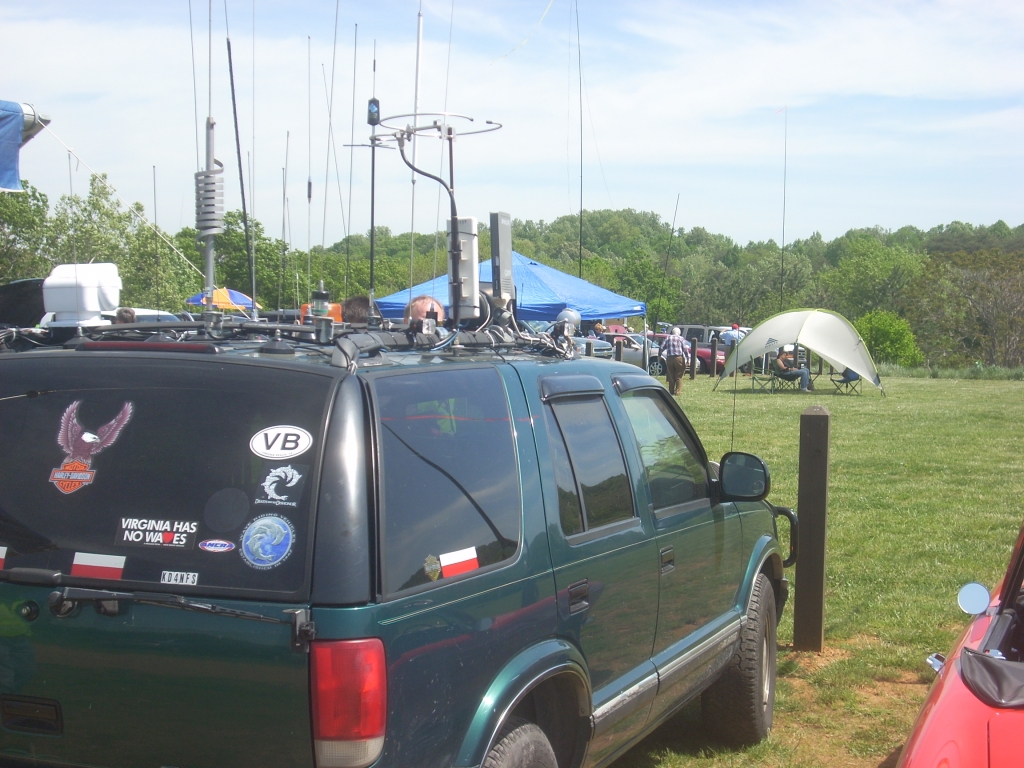
Every now and then when I go to a hamfest I'll see a plethora of vehicles in the parking lot that look straight out of science fiction, what with antennae all over the trunk, the hood, the top, or somewhere in between. They are affectionately called "porcupines" in many circles.

Then there's this guy...


Sometimes I'll catch a porcupine on a web site or two, here's one from People of Walmart:


Even the ARRL has a few porcupines every now and again:


A Google search yielded this beauty:

How do you even SEE out the window?
I think the most antennae anyone I personally knew had on their vehicle was 5. I myself had 2 at the most. Actually, 3. My old pickup truck had a 10m stick on the back bumper, a mag-mount 2m on the top, and a dual-band thru-the-glass mount for 2m/440 (which never tuned correctly).

My philosophy is that if you need to have an antenna on your car, have a radio to go with it. If you have so many radios that people can't get in the car, then you might have therapy in your future...

But seriously, some do go overboard with their passions in life, but as long as it's safe and responsible, then by all means have at it. 

Friday, June 1, 2012

Trip to Clingman's Dome, discovering SOTA

The view from Clingman's Dome at sunset
I hope everyone had a happy Memorial Day weekend. It's good to take pause and remember that many brave men and women paid the ultimate price for all of us Americans to freely express ourselves and enjoy the lives we live day in and day out.

I decided to take the family up into the mountains and watch a sunset from Clingman's Dome in the Great Smoky Mountains National Park Monday. We were supposed to go on Sunday but plans didn't work out (as they never do with me!). 

When we got I pulled out my trusty Wouxun 2m/220 radio and attempted to make some contacts on 6.52 simplex but, unlike 2 weeks ago when I went up to "the Dome", there was no one willing to talk. 

As I trekked up the steep path to the overlook I made a couple of quick QSOs with locals on a repeater, and stowed my radio for use from the observation tower. As we got to the base of the ramp leading up to the tower, I looked up and saw a rotatable dipole jutting out from the side of the dome. I quickly realized someone else on the tower had a ham ticket and was tearing it up on HF!

W3FF Buddipole
I got to the top and met up with Lynn, KJ4ERJ who was visiting from Florida. I asked about his operation and he told me he was working "SOTA", or "Summits on the Air". It was the first I've heard of such a program (even though I've been a ham for 18-1/2 years) but sounded very interesting.

I was offered a chance to operate but declined. I was having enough fun enjoying listening to the contacts coming in from New Mexico, New York, Florida, Arizona, and New Jersey on his Yaesu FT-817.

I tried simplex again and wasn't successful. I made a couple more repeater contacts and stayed long enough to realize that the sunset I had hoped to view was lost to the clouds off to the west.

Lynn and his son Paul, KJ4DXK were hammering out contact after contact on the rotatable dipole (set up for 20m meters) and I had to find out more about the antenna. I discovered it was a "buddipole" and watching it in action showed its value, as Paul and Lynn continued to rack up contact after contact on 2.5W, getting 5/9 reports from almost everyone.

KJ4ERJ working a contact on 20m
I tried to drum up a few contacts for them by sending a message to my Twitter account, but I forgot, I'm on TOP OF A MOUNTAIN, and cell phone coverage didn't exist. Unfortunately I couldn't raise anyone on the repeaters in order to spread the word about their operation. Talk about bad timing!

Summits on the Air (according to their web site) is "an award scheme for radio amateurs and shortwave listeners that encourages portable operation in mountainous areas. SOTA has been carefully designed to make participation possible for everyone...There are awards for activators (those who ascend to the summits) and chasers." It sounds like something I need to investigate at some point. This may soon become another pet project!


The weather atop Clingman's Dome is some of the most hostile and unpredictable I've ever encountered. I've been up to the Dome numerous times, typically to stargaze after dark and on occasion to take my ham gear up and work some contacts, though it's typically on VHF. I've been up to watch meteor showers, join an astronomy party, and of course, enjoy the view. But you do need to dress warm for the trip. Memorial Day it was 95 degrees at my house, but when we got to the Dome, it was 60. And as the sun went behind the clouds to the west, the constant wind at the tower added a chill to the air that made us beat a hasty retreat back to the car.

One evening my wife and I ventured up to the Dome's parking area to watch a meteor shower, and it was one of the clearest views I've ever had of the stars. Then we go back a week later, and the weather in Knoxville is clear and dry, but high up on the mountain, when we arrived at Newfound Gap, just before getting onto the 7-mile road to the Dome, a thunderstorm brewed up from nowhere and made for a treacherous retreat from the mountain...back to a clear and dry Knoxville. More often than not, it's clear everywhere BUT the Dome, and when I arrive in the parking area, it's nothing but fog.

Still, going up to Clingman's Dome is well worth the trip. Whether it's to stargaze, enjoy the view, or work a few radio contacts, it's guaranteed to be an adventure.

Saturday, August 13, 2011

What's the frequency, Kenneth???

Off and on I've been trying to find a way to listen to the meteor showers that frequently hit the Earth. The idea is that as a meteor hits the ionosphere, it scatters said ions and radio frequency signals that normally would just radiate into space are instead reflected back towards earth. Hams frequently use this method when making contacts via meteor scatter

There are web sites set up for people to listen to the NAVSPASUR (Air Force Space Surveillance System) transmitters on 216 MHz. I've not been able to hear the transmitters even though I live close to the facility in Alabama.

I've tried to listen to the meteors using a "poor man's" method of listening to TV signals from stations in other cities like Chattanooga and Bristol, TN. That idea went out the window when the FCC kicked TV stations off the analog frequencies in 2009. I've tried listening to FM radio stations using this method, but the dilemma I have is that, with Knoxville being such a big radio market, practically every available frequency from 88-108 MHz is taken locally.

So now I'm left trying to find any good radio frequency that would work for me to listen to meteors "pinging" the atmosphere. It needs to be outside the Knoxville area, constantly transmitting, and with a high enough power to be heard distinctly when the meteors pass overhead.

If anyone can assist with this quagmire, I'd be most appreciative.

Saturday, February 12, 2011

Tough times for towers

They say things happen in threes, and tower fights are no exception.

Within a week, 3 articles appear online about homeowners fighting neighbors over towers in their backyards:

  • In Maryland, residents in Severna Park are up in arms over construction of an 80' tower despite owner Richard Hambly (W2GPS) obtaining all the necessary permits for the tower. Hambly, who designs GPS hardware and is a consultant on Satellite projects (someone who's quite familiar with radio interference issues) is facing complaints that neighbors have about the tower affecting property value and aesthetics and one complained that neighbors were not consulted beforehand. I didn't know hams needed their neighbors' blessings before putting up towers...

    An appeal to rescind his permit was on February 9th.
  • In New York City, residents are complaining that a 30' tower was constructed illegally and is obstructing their view (as if there's much to see in NYC other than more buildings, judging by the slideshow).

    Paul Isaacs, W2JGQ contends it was constructed legally but the city apparently revoked the permit.

    Citing a work order stoppage, residents are demanding the tower be removed permanently.
  • And out in Arizona, Lee Winsor, K1VIK is in a dispute with neighbors over 2 towers he wants built (40 and 33 feet respectively) and is claiming his knowledge of ham radio and the need for antennas trumps that of the city planning staff and wants an engineering study performed. Casa Grande ordinance states that towers cannot exceed the height of the roof of the main structure on the property, which in this case is 16 feet.

    68 residents signed a petition to have construction of the tower blocked.

Tuesday, September 14, 2010

My 2m tape-measure antenna project

I've never been much of a "do-it-yourself" kind of person. Usually I buy whatever it is I need pre-fabricated, or have someone help me out (which basically employs my standing around getting tools and/or coffee for whomever is doing the actual work) after I buy the parts.

Take my 6m dipole for instance. I had it made for me by my friend Tim, KE4OTZ. Once I saw how simple it was, I sat there wondering why in the hell I didn't just do it myself...but that's the way I am, just too intimidated to try it thinking I'm going to set my equipment on fire if I do try to do it on my own. And chances are, I would...

When it comes to antennas, I just never felt like I was confident enough to do it properly. But last week I was shown a unique type of antenna that can be built with PVC tubing, tape measure tape, and hose clamps. And that made me think, to borrow a tired cliche, that if *I* could do it...

What was even more of an amazing coincidence was that when I talked to a ham friend of mine I work with (John, KD4DLU) he told me he made one of these himself and loved it. So, later that evening after work he and I met up and he showed it to me and let me borrow it for the weekend.

Within a few moments of looking at it, I knew this was an antenna I wanted to build, and I wanted to do it myself!

And not only did I do it myself, I did it fast, too. This could be constructed in less than 2 hours, and that's with a trip to the hardware store to get what you need.

So, last Sunday afternoon I went to the store and picked up the PVC connectors I needed, (I already had the right size PVC pipe from a previous project) along with the metal hose clamps and the tape measure. I bought the cheapest 25' roll they had, which was just under $5. I didn't need anything fancy, since the only thing I needed after all was the metal tape itself. And do make sure it is metal tape measure you are buying.

I got home and the first thing I did was to bring up the project's web page (written by Joe, WB2HOL) and got the measurements of the elements I would need. I extracted all 25+ feet of the tape, cut it using ordinary (but expendable) scissors and set the now-empty cartridge aside (you should hear the spring on one when it tries to reel in an empty roll of tape). I then cut the lengths I needed. In fact, I had so much tape measure left over I can actually make 2 of these antennas or add additional elements if I wanted more improved directionality of the yagi.

One note about the tape measure components is that they have sharp edges. I trimmed the edges off at the corners (see picture) and then applied electrical tape to the ends in order to prevent the sharp edges from cutting or stabbing me when handling it.

Next, I cut the PVC pipe into the proper lengths and then connected them together. I didn't need glue to hold the PVC fittings together, but it can be used if you prefer. I took the tape measure pieces for the reflector and director elements and connected them with the hose clamps. The bigger part of the project was getting the driven element parts connected to the array.

I had to use sandpaper to get the heavy paint off the tape measure components so that I could solder the coax and the hairpin match to them. Once I did that I warmed up the soldering iron.

While the soldering gun warmed up I searched for some wire for the "U"-shaped hairpin match, and eventually took some old wiring from an old ATX computer tower's power switch and stripped it to the required length for the hairpin match. Then, I took a string of coax from an old Radio Shack mag-mount antenna and cut about 12" off the end. I would later regret this, to be honest, as I should have cut a much longer length.

I then took some solder to the tape measure pieces before attaching them to the antenna structure. This works best so that when you attach the elements to the PVC pipe, you can then solder the coax and hairpin wire quickly without melting into the PVC underneath.

After I connected the driven element segments to the PVC, I wrapped electrical tape around the bend of the "U" shape in order to hold it in place against the PVC and then soldered the hairpin wire to the tape measure. It was very easy, almost too easy, really. In order to set the proper 3/4" distance between the leads, I took a scrap piece of tape measure cut to 3/4" and used it as a spacer. this was discarded once I had the correct distance between the two driven elements.

I then took the shielding off the RG-58 coax and then twisted it together, then tinned the shielding in advance and then soldered it to the tape measure mounted on the PVC. It was less than 3 seconds for the solder to melt enough for the wire to penetrate. Same with the center conductor. I even applied more solder afterward with no melting of the PVC pipe. The hairpin wire did not move when the solder melted around it as I applied the coax connector.

And just like that, I was done! I could not believe how easy it was, to be honest. I measured the SWR and it was 1.1 to 1.3 on 146.555 MHz. And I didn't have to adjust anything!

I plan to use it for a foxhunting project that the University of Tennessee Amateur Radio Club is putting together in October.

Again, I think I'm going to re-do the coax connector to make the cable much longer than the one I have on there now. Other than that I couldn't be more pleased with myself. In fact, I'm actually thinking of making one of these with more elements in order to narrow the beamwidth down even more, and use on a field day or mountaintop journey.

If you had to buy all the parts, you should not be out more than $25 at the most, I would think. Since I had the PVC pipe already, that trimmed the expense a tad. The most expensive part was the 10-pack of hose clamps, at just under $9. Zip ties or self-tapping screws can also work if you're on a tight budget. I recommend the hose clamps on the driven element at the very least in order to keep the element in place more securely.

Below are some additional pictures if you are so bold to try and take on such an intriguing endeavor. It's certainly an easy project that anyone can do and will not take all day or all your money to invest in the effort. It's a guaranteed confidence-builder.

Here are some additional pictures:

This is a shot of my measuring out one of the lengths for the two driven elements to be installed in the center.


Use sandpaper to strip the paint off the tape measure for the center radiators to ensure a good connection with the coax and the "U"-shaped hairpin match.


The hose clamps connected to the D1 driven element. Tie wraps can also be used or perhaps even electrical tape, but they will wear out over time. Self-tapping screws are also a possibility.


Preparing to mount onto the PVC fitting and solder the coax and hairpin match to the center elements.


The "U"-shaped hairpin match is soldered on. I used electrical tape to hold it against the PVC, which helped during soldering of both it and the coax. I took off the tape to show the match, but it can be left on to keep from getting it caught on anything.


To measure the correct 3/4 distance between the hairpin match wires on either side, I simply took a 3/4 inch piece of scrapped tape measure and used it as a spacer between the two leads. This does NOT get attached to the antenna, it is thrown away afterward.


Tuesday, June 22, 2010

Mt. Pleasant, WI is not kind to ham radio

If you're a ham operator, or the father of one, and you or a member of your family have special needs, stay away from Mt. Pleasant, Wisconsin.

The town's planning commission ordered that a tower belonging to the Markstrom family was to be taken down after it was determined that the Markstroms did not secure the proper permits to erect it.

But it's not so much the planning commission, as it is the neighbors who all of a sudden claim that the tower's interfering with their TVs. The complaints were brought on after Jim (KB9MMA) and his son Samm (KC9POP) had their community service during severe weather attract unwanted attention by local officials and neighbors. Samm is 10 and has issues with Cerebral Palsy.

Granted, I don't live there, and I'm certainly biased when it comes to ham radio towers and the right to have one (I will NEVER live in an HOA thanks to their micro-plutocracies that base their "laws" on the almighty $$$ at the expense of individuality and the freedom of expression) but when the neighbors call a ten-year old a "media puppet" and are indifferent to the public service he's been awarded, the negative attention given to the neighbors is warranted in my opinion.

It looks like several media outlets have reported the story and there's even a facebook page dedicated to the cause.

However, now that the commission has spoken, it looks to be a lost cause. Jim has said he may sue to keep the tower, but at this point, why bother? Get the hell out of there, and move to a place that has wide open spaces, and welcomes the community service that Samm employs in order to get out of his shell that his disability has encased him.

And if Mt. Pleasant, God forbid, gets hit with a tornado, I would certainly hope they have ample warning. They would, if they'd allow one ham and his son to keep their tower.

Tuesday, June 15, 2010

Doppler-gangers

Due to the nature of the subject, I've omitted names and callsigns.

Over the last few weeks we've had several individuals causing malicious interference across several repeaters here in East Tennessee. One was caught a few weeks ago, and turned out to be a non-ham. Of the few others that have appeared, one has been very clever in hiding his (or her) signal quite well, but a few have been able to pick them up. While we have a few leads as to who the suspects are, we haven't singled any people out (yet!).

So, last night on my way home, I checked in to the local SKYWARN net and listened in to the gang wrapping up the net as the weather abated. However, as I was checking on some weather approaching from Nashville, we suddenly heard a dear carrier, covering up all signals.

My immediate reaction was that the NWS station had left the mic stuck in the "transmit" position. However, the NWS station chimed in on another repeater that they were not the cause. So the next natural suggestion was that we had a QRMer.

However, something told me it wasn't intentional. The normal interference we had heard was someone scratching a mic, retransmitting signals from HF, or the occasional bodily function. This was just silence. However, a couple of other hams were convinced it was intentional, because they'd been getting QRM recently.

I stepped up my drive home and arrived and put my home station into action. I swung the beams south and immediately got a spike in my signal strength (about S-7) to the southeast, towards Pigeon Forge. We'd had a couple of leads of QRMers from that area, so I started to think we had a bead on the signal from that general direction. However, another ham advised they had a strong signal near McGee-Tyson Airport, directly south of me. I swung my beams due south, and the signal shot to S-9, almost full quieting! Now, all I needed was another ham with a beam to triangulate a general location.

Unfortunately, no one else with a beam was listening, or wasn't hearing the signal.

I got on the repeater's output frequency and sent out a simplex transmission that we were actively searching for the signal. The repeater owner was listening and managed to shut the repeater off through a control link on another band, preventing damage to his repeater.

A DFer with a doppler unit was in the area, so I advised he head towards the airport. While the DFers were doing their manhunt, I got on the repeater's output frequency again and advised that I had the signal to the south and requested input from users who could hear the signal and give a direction or bearing. Unfortunately, no one was giving beam headings or any signal report. I gave out my phone number and a couple of hams called and gave me some signal strength reports, but again, not from a beam, just what they picked up on their HTs.

About 30 minutes into the situation, we new this was not intentional. No one with common sense would risk their equipment just to harass other hams, especially during a SKYWARN net. 3-4 DFers got in on the hunt, and they had bearings near the airport, but further south. As they got closer to the transmitter, I began looking up hams in the QRZ database who might be in the area. I would ask for street names to try and see if there was any hams who lived on particular streets. After they gave information on one street, I called out a ham's callsign and address, and they sped towards that position. Another ham knew they person and called him on the phone. It turned out he was not the QRMer. The DFer's briefly stayed, using the time to get another bearing before continuing on.

Suddenly, the signal developed noise. it had now been transmitting for over an hour and I figured the radio was beginning to overheat. It went from S-9 to S-7 on my radio's signal strength meter. Some thought the drop in signal was an indication it was mobile, but I didn't hear "picket fencing", indicative of a mobile station on the move.

As the DFers moved in closer, the signal suddenly dropped out. Was the radio dead? The hunters made comments that the radio must've died, but suddenly it reappeared, then cut out again! Suspicion arose. Was this intentional, and the guy was messing with us? Was he monitoring us and shutting off the transmitter the closer the hunters were getting?

Suddenly, it came on again. Then off, and on...it appeared to me that the transmitter was shutting itself off due to thermal protection. We knew we had to find it before the radio was permanently damaged, or worse, started a fire!

We were approaching 2 hours, when suddenly one of the DFers picked up a strong signal near the house of a well-known ham. We finally had our culprit.

The ham had gone out to tend to some business and had just plugged in an ICOM radio he had just acquired. His wife was home and allowed one of the DFers in to check the equipment, and the radio was finally turned off. It turned out the mic had a short in the wiring, and was shorted to transmit.

The radio itself was warm, but not terribly hot. The power supply, however, was able to fry an egg, from what I was told.

It was a successful "hunt" and with the terrain and occasional "kerchunk" from hams trying to figure out why the repeater wasn't on, the DFers were able to resolve the situation in good time.

It was a great exercise in direction finding. Hopefully the lessons learned will make the hunters better when it comes time to locate the actual QRMers on the repeaters.

Tuesday, April 13, 2010

CQD CQD MGY...

Sorry I haven't posted in 3 months. Fact is, I haven't done much radio to talk about.

Lauren's too busy with school to get on the air, but all that may change. We're moving our bedroom back downstairs, where all the radios reside, so we may both be getting a little more airtime. Maybe even Jes will partake in some on-air activity.

I turned 40 last week. Not too happy about it, really, but you can't stop it from happening. It was uneventful, a couple of dinners, and a weekend in Pigeon Forge with the wife.

There they opened a new museum called "Titanic" on Thursday, almost 98 years to the day it set sail on its ill-fated maiden voyage, and we went to it on Sunday. We took pictures of it and naturally, the antenna is what attracted my attention. Since this is a mockup of the forward half of the ship, the entire antenna wasn't there. However, I still contemplated what the resonant frequency of that mockup was...

It's hard to see from this photo but the 4-wire antenna is suspended from the mast in the front to the 2nd funnel (on the real Titanic, there was a 2nd mast positioned behind the 4th funnel, or "dummy" funnel).

The museum did an excellent job in maintaining the historical accuracy of all parts of the Titanic. Radio buffs will be extremely pleased with the way the radio officers John Phillips and Harold Bride are portrayed. They sent distress signals right up until power went out in the radio room and the ship was moments from going under.


Sadly, John Phillips (left) died. Harold Bride survived the sinking, passing away in 1956.

There is a page dedicated to the Marconi room of Titanic I highly recommend. It includes the radio traffic messages passed between Titanic and many of the ships who were rushing to her aid. Titanic used the callsign "MGY", which it was assigned in January of 1912. You'll see the calls of "CQD MGY" (CQD was the predecessor to today's SOS distress call) and the ships that responded.

This photo is the only known photo to exist of Titanic's actual Marconi room. It's a double exposure photo taken by Father Frank Browne who disembarked Titanic at Queensland, her last stop before crossing the Atlantic towards her destiny and history. Had Father Browne remained on board, not only would he have most likely died, but the photos he took would have been destroyed by the sea, and with it, many of the unique photographs only Father Browne was able to capture, including one of Titanic's Captain Smith, and that of a child playing on one of the decks, the only photos of their kind known to exist.

If you make your way to Pigeon Forge (or Branson, MO) do stop in and pay a visit. It's well worth the time and money. We spent about 3 hours in the museum (self-guided) and there's information about Titanic even the most hardcore of enthusiasts will discover. There's even an interactive exhibit that will show you the Morse lettering and will allow you to tap out your name on a touch-screen straight key.

I may even start calling my radio room a Marconi room...if I can ever freshen up on my CW...but that's another story.

Monday, August 10, 2009

The great radio install odyssey

Every once in a while it's good to challenge yourself, to think out the processes of how to execute the procedure, and to adapt to changes brought on by obstacles in your way. Such was the case in early June getting a radio installed in my SUV...

I own a 2002 Chevy Trailblazer. It's nice, got it used almost 2 years ago, and with few exceptions have enjoyed the vehicle. I had not installed a ham radio in it as I did not have all the right equipment, the money to invest in said equipment, and I didn't want to drill holes anywhere that were visible or otherwise.

I'm not the most mechanically inclined person out there, and I am the last person you'd want to talk shop with on auto body and repair. So I met this challenge with great trepidation. Given my track record in the past, if I screwed something up, I was going to FUBAR the entire electrical system, spring a leak in the oil pan, or somehow generate a wormhole to Alpha Centauri.

This started about a year ago. See, my initial plan was to place the antenna in much the same configuration as what is on our Windstar minivan, which was to have a mount on the rear tailgate and off to the side. Unfortunately, the Trailblazer's tailgate is set so that the windows and the metal are seamless and it's impossible to mount the Comet CP-5 in the rear. So I decided I would mount it on the hood of the Trailblazer. This has become a subject of debate for a couple of my friends and I. One thinks I'm going to cook my brain every time I key the microphone at 50w. I, on the other hand, feel less conservative when it comes to that. I've been using my cell phone for several years, and haven't felt any side effects...yet...

Next, what kind of antenna will I purchase? I have several mobile radios, the Alinco DR-135 2m with TNC, the Kenwood TM-742 tribander (2m/220/440), the Yaesu FT-1802 2m, and a beat-up but functioning Yaesu FT-5100 dual-band mobile. I also have the Yaesu FT-100D I could take mobile, and my wife's FT-7800 dual band which is in her minivan.

I purchased the Comet mount and a tri-band antenna (2m/220/440) at the Knoxville hamfest last June (as in 2008). I figured if I was going to invest, I might as well get one for all three bands on my mobile radio collection. Somewhere in this house (I think) is the ATAS-100 antenna for the Yaesu FT-100D. I misplaced it after a Field Day some years ago and unless someone swiped it (which in my world is possible) I just have yet to find it.

I started initially by asking questions on both ham radio forums and on forums for Trailblazer owners. I wanted to get as much info as possible. I had people who were TB owners, Chevy mechanics, and even a pro installer helping me out as much as possible. Through it all, I kept putting it off because I just didn't want to drill a hole in the firewall or, as mentioned before, tear something up that would end up being a $4000 repair job. I even began calling around to see what estimates the pro installers would want to put it in, I was that intimidated by the project.

Every so often I would glance into the engine or under the carpeting to see where I could poke a hole if need be. However, I never quite made the connections between where the grommet was that would go into the engine compartment. Again, my naiveté in all things mechanical prevented me from connecting the dots. In April my wife decided we needed to go visit her sister's home in Iowa. The trip would be in the Trailblazer. When the plans were finalized, I decided to buckle down and get the radio installed. So, I concentrated on the antenna first, and would worry about the radio later.

Day 1: Questions, questions

For months off and on, I probed the forums and asked about where the plugs/grommets/holes were supposed to be. As things ramped up on getting the trip planned, so too, did I re-visit the issues on the forums. I studied the forums for signs of where to install the radio (didn't want it on top of the dashboard, and couldn't fit in between the seats). I finally found a forum thread where a user had installed a ham radio in his TB and he mentioned the location of a rubber grommet, and I went outside (at 11 at night) and found it. Okay, so part of the mystery was solved. Now, how to either widen the hole in the center (which was tight due to the wires already occupying the center of the grommet) or to loosen it and fish the wires through. Again, my reservations crept up as I once again did not want to poke a hole, and have it hit the wiring and shock the hell out of me or short the entire dashboard to oblivion.

Once I was assured I was not going to electrocute myself, or go broke fixing a screwup, I bought an awl just for the purpose of poking through the grommet. Then I embarked on a search for the infernal T-connectors that no one seems to carry, yet every damned one of my radios (sans the FT-100D) has them out of the box. Go ahead and try to find them at your local shops. I dare you. I twittered my contacts, which spilled onto my Facebook page (my "tweets" also simulcast to Facebook) and no one could help except for a link to Powerwerx.com. I tried hardware stores, Radio Shack, and even a CB shop, to which I was met with the somewhat-unsurprising, "Sir, I have NO idea what in hell yer talkin' bout" response. Nevertheless, imagine my surprise when I remembered there was a spare cable at home in the FT-1802's box, freeing me the agony of having to go through the ordeal I just embarked. I'm a glutton, I suppose. But now I have the two things I need to get the party started, along with the antenna mount and antenna.

Day 2: Shock and awl

After work the next day, I come home and start to gather all my items for the install. I've got most every tool I can imagine, most others I can't, and the assortment of implements of destruction to carry out the deed. I get the awl ready to go and aim at the target, the grommet. I gingerly work the awl in, and to my surprise, no sparks, smell of ozone, and no electrocution!

So now I go find out where the grommet exited:

The grommet going into the engine was basically staring me in the face all this time. I never realized the grommet set so high into the engine area. I thought it was much lower. So much for my depth perception...

So I then start to wiggle the awl around and try to widen the hole. As I'm reaching for my pocket knife, the grommet pops off one side. "Great", I thought, but as I checked, it seemed like it would be the optimal place to fish the wire and antenna coax through, so I decided to simply route the wires through the side. The result is below:

Not the greatest job, I'll admit, but for what I needed, it works. I'm going to re-work it later on to where the grommet has a better seal overall.

So I get the power cable in, then the antenna is next. It, too, easily goes in with little convincing. The antenna was mounted to the hood in little time (pic to the left), and I feel like I'm making great progress. I install split flex tubing around the antenna and power cables, then have to stop everything and make a quick run to pick up one of my kids from a friend's house.

Upon returning home, I work on getting the power cable into the battery. Boy was that a riot! Without boring you, I'll just say it took 2 hours, yelling at the connector, cursing deities for smiting me, shaving off some of the rubber insulation around the battery connector to fit the wire into the bolt so it would have a firm connection, and divorce lawyers on standby.

After that odyssey, night fell, and it was time to call it a night. 7 days to Iowa, and I started to feel pressure. Just how easy would the install be?

Day 3: A mobile conundrum

Again, I am working, and I spent part of the day (and my lunch hour) scouring for ideas on where to put whatever radio I was going to use. I got home and the weather was getting stormy, so I decided I'd work on my Yaesu FT-5100 and try to blow the cobwebs off and see if I could make it mobile-ready. My wife was at work, and the kids were antsy due to the storms and lightning in the area, and I took my radio, old Radio Shack (errr...sorry..."The Shack") magnet mount antenna, and a power supply upstairs to work on programming it while the rain came down.

I stuck the mag-mount sideways onto my tower, and fed the coax in from the back door to the dining room table. I hook everything up and start to try and sort out the radio's startup issues (apparently it was modified, and a very complicated process had to be done to just get the radio to get into the proper bands for starting up, as well as discovering the battery in the radio for memory was apparently long-dead) and the rain outside turns to a monsoon. My tower is located next to the gutter, and the gutter became clogged. Niagara Falls is now right outside my door, so I venture out to unclog the gutter. As I grab a clump of...something leafy, brownish, and soggy, I toss it over the opposite side of the tower, but it hits the mag-mount and takes it down. The mag-mount falls, and the attached coax yanks the radio off the table.

At first, it appears that everything is fine, and I pick up the radio and reconnect it. But when I power the radio back on and push the "Function" button (F/W) it's stuck. As are two other buttons on the face plate. It appearently landed on the VFO knob and jammed the front good and solid. I didn't pay a lot for the radio, and apparently I got what I paid for. Karma is not shining well on me.

So I look at my other multi-band radios. The Kenwood 742 tri-bander (which I do not have a mount for), my FT-100 (wrong power connector), and my monoband FT-1802. My wife tells me to take the 7800 out of her minivan and use it for the trip, since she seldom uses it when she drives the minivan (unless I'm driving in a caravan or using it while driving her car). I decide it's the best option since it did have 440 capability. So after the monsoon, I went out at 11PM-ish and took the radio and mount out of the minivan and took it back to the Trailblazer. The 7800 was set up with the radio's chassis in the back of the van, and the faceplate (separated) in the front of the minivan. So imagine my surprise when I can't find the cable to connect the faceplate back to the chassis, just the 20' long cable from the back to the front...

So I have a couple of options, find a place to mount the chassis SOMEWHERE up front, and put the face up on the dash, or try to get a new cable made for mounting the radio to the chassis. Ant this is not just any cable. It's RJ-12. Picture normal telephone cable (RJ-11). It has 4 wires. RJ-12 fits a plug the size of RJ-11, but it has 6 wires. This is not going to be easy to find, it appears. So, I leave the radio in the car and go back inside, feeling modestly defeated. Another day, another setback.

Day 4: CABLE GUY!!!!

I get to work the next morning, the radio riding shotgun since I hadn't mounted it yet. I get to work and ask a co-worker if he had crimpers at his house (he used to be a cable installer). Unfortunately he didn't have any equipment anymore as he sold it all years ago. I take one of my breaks and run out to a wiring supply store located across from the place I work, and ask for RJ-12 cable. They said they didn't carry any there, that it was special order (and in 1000' rolls) and that I would need a lot of luck finding some in Oak Ridge. I thought it funny, because, well, Oak Ridge did have a little technological history here and there...

I go back to work and talk more with my co-worker, and he suggested buying crimpers and checking Home Depot for the plugs, and take the 20' cable I had and cut off and end and cut it for the 3" piece I needed for the direct connection between the chassis and faceplate. So I run to the Home Depot during lunch, and I buy crimpers that were cheap, but were "designed for RJ-11/12 connectors". And by good fortune, they did indeed carry RJ-12 plugs! I do love that place sometimes...

I ran back to work, wolfed down my lunch, and worked on the cable. I cut one end, hooked up the cable in the proper orientation (based on how the original cable was set, you have to flip the connector's wires) and crimped.
It was then I made another ill-fated discovery. The crimpers were "RJ-11/12 compatible" but they only crimped RJ-11's 4 wires, with NO CRIMPS ON THE OUTER 2 for RJ-12!!!

I found a couple of guys installing network cable in the building and begged for crimpers, and they said they didn't have any that day (they were finishing a project which didn't involve crimping anything, apparently) and once again I'm out of luck. Thinking fast, I replaced the crimpers in its packaging, taped up the package, and after work ran back to Home Depot and exchanged it for REAL crimpers...the kind that were indeed made for RJ-11, 12, 45, 92, 85, 55, BINGO!

I get out to the car, remove the crimpers, and with a quick bit of careful pressure, had me a connector cable for the radio! I placed the faceplate to the chassis (a bit of a struggle because the cable was 1/4" too long) and plugged in the radio and antenna. Life was good! I might get this thing installed after all.

I get home and get to work on the mounting of the radio. I snake all the excess wiring under every crevice I can think of, under the carpeting, behind the center console, under the console, etc. I decide that the best place for the radio is below and to the right of the steering column, where I had seen another person on the Trailblazer forum mount his radio.

I mount the bracket, putting two small holes "conveniently" out of view. It was here that I faced yet ANOTHER issue. I put the bracket so close to the center console I had little room for the screws with which to mount the damned radio!

BUT...I refused to be set back anymore. I was able to use a magnet screwdriver to hold one screw in place while getting the radio mounted in the bracket. I used what little space I had and needle-nosed pliers to put the final twists on this odyssey. A couple of zip ties later, I finally have my radio installed!

The finished product is below:


So, if you've made it this far, you have (hopefully) gone through the best/worst of times, just as I did (I have a habit of wanting to make the reader emotionally involved in my stories).

I learned a lot about this install. Mainly I learned I could actually do it. Most other times I've had someone install it with me or for me. It built up confidence I needed, and hopefully will not be so intimidated on my next install.

My next post will be what happened on the way to (and in) Iowa on the radio. Was it worth the trouble getting a radio installed? Stay tuned. I'll have it posted in the next week.