Just an FYI, I've finally took the plunge and reserved K4HSM.com to be used for this weblog. At least for now. I've considered revamping into a completely different website but that's a long ways off at this time.
KHAOS.net still works, it will simply forward to this page. The old hyperlinks for previous articles will not work, however!!! Please update links to previous articles.
I may sell off KHAOS.net since I have no real use for it and the plans I had for it are not going to happen. If you're interested in it, please let me know.
QRZ Logbook

Showing posts with label internet. Show all posts
Showing posts with label internet. Show all posts
Saturday, July 11, 2015


Tuesday, August 21, 2012
Troubleshooting WiFi can be tricky...
Don't you hate it when your interwebs goes down? It's been happening to me a lot lately where I would lose all connectivity, yet my cable modem and router both say everything's fine, and I've been racking my brain trying to figure out the source of the problem.
Like many, my first reaction was to call tech support. When I called, I asked if there was an outage in the area, since it seemed as though I was connected to my router but not pulling any web sites, I assumed it was an outage. Having worked tech support for a living, I'm sure my ISP's support was going to love my call.
When I called about a week ago, the tech said he saw a "lot of packet loss" on my cable modem, and there wasn't an outage, so I had the option of having a tech come out or visiting the office and having my modem replaced. My wife was on the cordless phone so I couldn't ask her what time she'd be home to send a tech out, so I chose the latter.
But after I hung up, I got to thinking more about what might be the lowest common denominator to the problem, and it did occur to me that it was raining when these outages occurred, so I went outside to where the box was connected from the main line to the house and noticed a lot of growth from an untrimmed forsythia bush around the box (along with a spider or three), so, at 10PM at night, after a monsoon, I grab the trimmers and decide to prune the forsythia away from the outside box. My wife had hung up the phone and came out holding the flashlight wondering what the hell I was doing...
Once I completed the pruning, my internet connectivity was back. So I was happy that I might have fixed the problem. But I noticed the issue return last weekend. It had rained briefly but not a lot to make me think there was the same problem as last time.
One of my kids was on the phone and asked if we were having internet problems because her friend was having the same issues. So, I chalked it up to an actual outage and tried again an hour later, and it was fine.
So earlier tonight, it happens yet again. No internet. I was at my ropes end this time. I called tech support on my cell phone (I couldn't use the home phone because my wife was talking to a friend about a rash on Lauren's head) and had to wait 5 minutes for a tech. I ran outside to check the box (it hasn't rained since last Friday) and all was fine. I went downstairs and rebooted the modem and my WiFi router twice. Then, as my wife hung up the phone and asked me what was going on, the tech came on the line and miraculously my internet came back up.
We spent a few minutes with tech support discussing my options, and once again I decide I probably need to swap out the cable modem, so I get off the phone with tech support, then it hits me...the home phone!!!
Now I start to replay all the outages and sure enough, the HOME PHONE was in use every single time. I have bundling through my cable provider for TV, internet, and phone service. My initial instinct was that one service was screwing up another.
I hop back on the phone with tech support and tell them about my discovery. But the tech support guy had one up on me that I hadn't considered, yet should have thought about first. He simply asked "do you have a CORDLESS phone?"...
And that's when it struck me, my 2.4GHz cordless phone was interfering with the 2.4GHz WiFi router I just acquired 3 weeks ago.
It appears that they're on the same channel and when I get a phone call, the cordless phone is transmitting a more powerful signal between the base and handset and simply kills my WiFi.
So I was foiled by my own cordless phone. And I'm left with a decision. Get a different phone, set my WiFi router to a specific channel that may not be covered by the cordless phone, or perhaps ditch the home phone entirely, which we've thought about doing anyway.
But I'm still trying to figure out the "packet loss" from the first call. Lazy tech near the end of his shift perhaps? Or was there was some legitimate issues with the outside box and the forsythias?
To be continued?
EDIT: Changing the wireless channel on the WiFi seems to have done the trick.
EDIT: Changing the wireless channel on the WiFi seems to have done the trick.
Tuesday, July 17, 2012
NASA gets interactive for Curiosity mission
The Mars Science Laboratory, AKA "Curiosity" is slated to land on Mars August 5. In preparation for the landing, NASA's come up with a slick interactive game for the Xbox 360 game console.

Using the Kinect controller, you guide the Curiosity thru EDL (Entry, Descent, and Landing) as the rover makes its way to the Red Planet. I downloaded it tonight and ot to play a few rounds. The more accurate you are at each stage, the more points you are awarded.
You first guide the vehicle through entry into the Martian atmosphere, and, using your body to keep the vehicle in the "center corridor". You'll go through pockets of turbulence and have to move the vehicle back to keep down the center line.
 |
Next, you enter the descent phase, where you must time your movements to the pyrotechnics that deploy the parachute, eject the heat shield and finally remove the backshell, exposing the rover and leading to the final stage, landing.
In the landing stage you'll use your hands to guide the rover down to the target landing area. Accuracy and ease of landing (with the limited supply of fuel) will count as you put Curiosity down following its "7 minutes of terror".

The game also includes a video and some info on the overall mission. The opening screen contains a countdown timer to the actual landing of Curiosity on August 5th.
The game and video are narrated by Al Chen, who is the Flight Dynamics and Operations Lead for Curiosity.
It's FREE to download (an Xbox Live membership is required, but you do not need to pay for use of the Live account) and available on the Xbox Live site.
And if you have a Twitter account, you can follow them @MarsCuriosity.
Sunday, April 17, 2011
WWV/WWVH Survey
As a ham we've all at some point heard and used WWV and WWVH for setting our clocks, guessing propagation, and getting solar info. There are even non-hams that use WWV without realizing it. They may have a self-setting clock that will listed for the time signal at least once a day and set their clock. And chances are your computer goes out to the NIST website and auto-set's your clock (if you're on XP and above, or OS X).
Right now they're conducting a survey online that might be beneficial to all of us hams out there.
Help make WWV and WWVH a little better by filling out the survey today!
Tuesday, December 22, 2009
My Christmas present to you: How to renew your ham license for FREE! *
If you've been licensed for over 10 years, chances are you've received notices from companies offering to renew your license for a "minimal fee".
Well, I'm about to save you some money, because you don't have to pay a dime if you do it yourself*.
All you need to do is to go to the FCC's Universal License System (ULS) site and renew online.
A few "quick notes":
- *If you have a vanity callsign (like I do) you will need to pay the vanity fee (currently $13.40 as of the posting of this article). This fee can also be paid online.
- You cannot renew until it is 90 days before the date of expiration and up to 2 years after the expiry. If you wait to renew after the expiration date, you CANNOT transmit on amateur radio frequencies from the date of expiration until it appears in the ULS as renewed! If you wait until after the 2-year grace period, it cannot be renewed, you will need to take the Technician Class exam to get re-licensed.
- This whole renewal process will NOT be instantaneous, it may take several days to process, so the sooner you fill out the renewal request during the 90-day window, the sooner it will get processed and you will not have to chance an interruption from using ham radio.
- If filing online is still not for you, then you can still print and fill out the Form 605 and file via snail mail. That's free as well. Also, the ARRL will do it free for members, but Vanity calls are $13.40 + $5 for processing.
Find your FRN
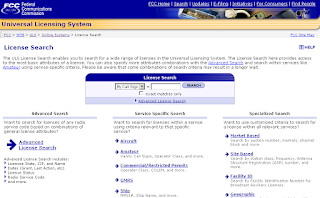
You will need to know your FRN (FCC Registration Number) in order to renew. Don't know it? Don't worry, all you need to do is look it up on the ULS search page.
To search for your FRN:
- Go to the ULS main page.
- Under the "Search" area, click "Licenses".
- In the search page enter your callsign.
- Locate your callsign. Under the "FRN" column (in the center) is your FRN that you will need to log in and renew your license. Write it down!
If you already know your FRN and password, go to the login page, sign on, and wait for me down below. Otherwise, continue on...
Chances are, you've never had to use ULS before, since either you've been a ham for less than 10 years, or renewed it before ULS online renewal was enacted, let someone else do it for you, or you got a new callsign (due to vanity request or license upgrade) and the 10-year term was reset upon the issuance of the new callsign. Therefore when you get back to the ULS sign-on page, click "Register".
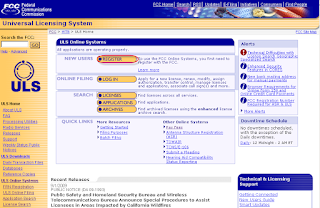

Personal Security Question
Now, if this is your first time using ULS, you probably have not set your Personal Security Question. If you have previously set up your Personal Security Question, skip to the next paragraph. If you have NOT set up a Personal Security Question, you will need to fill out an online request form and someone with the FCC will manually set this question and email you once complete. This may take a couple of days! To get to the request page, click the link that takes you to https://esupport.fcc.gov/password.htm.
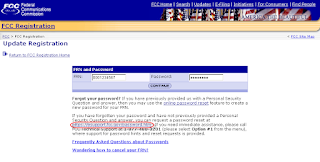
On the next page, click "Set your Personal Security Question" and the next page is where you fill out the Personal Security Question you want to set.
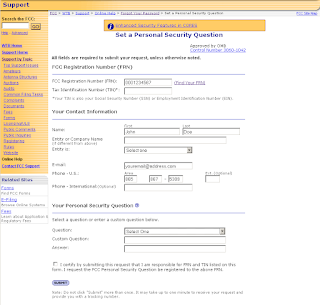
You will need your FRN, enter your contact info, and provide a current email address, then set whatever you want for your Personal Security Question. You can either choose a preset question from the dropdown menu, or set one up that you alone will know.
Again, someone contracted with the FCC will set the question and answer you chose so once again write it down!
Reset your password
Once you have received your email from the FCC that the Personal Security Question has been set up (or you already know it and skipped the previous paragraph) you will need to set your FRN password.
- From the ULS main page, click "Login", then go to the link to contact tech support, then click the link to reset your password.
- Enter your FRN (you did write it down, didn't you?).
- Answer the Personal Security Question you set up.
- Enter your new password (minimum 6 characters, combination of letters, numbers, and special characters (I highly recommend you do NOT use your callsign (if it was a 2X3).
- Once your password is reset you may get a notification from the FCC advising that your password was reset.
Time to Log in to the ULS
Hopefully you haven't given up hope and are not shilling out $5-10 for someone else to renew your license at this point. We're almost there, I promise!
You've gone through setting up your Personal Security Question and/or password, so now it's time to log in.
- From the ULS main page, click "Login".
- Enter your FRN (again, you did write it down somewhere?) and password.
- You should now be viewing your information (callsign, address, etc.):

- On the menu to the left, you will see a link to renew your license so click the link.

- The next page will show your callsign in a box on the left (you should have "Eligible" selected above the box with your callsign). Click you callsign to highlight it, and the select the "Add" button in between. Scroll down to the bottom of the page and click "Continue".
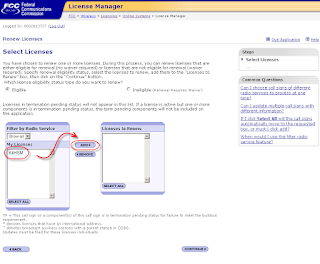
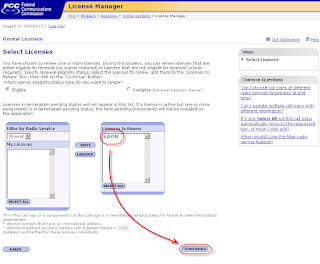
- Follow the remaining instructions to finish the registration and submit once you are ready.
If you have a Vanity call, you will be prompted to pay the fee associated with renewing a Vanity callsign once the renewal application has been successfully received. It will be in a "pending" mode until the Vanity fee is paid. I plan cover that process in a later posting.
And that, my friends, is what they're charging you for. So now, if all has gone through successfully, you will be placed in the queue for renewal. It shouldn't take more than a couple of business days to get updated in the ULS but give it up to 10 business days before attempting to contact the FCC for an update. Check the ULS for your callsign and note the expiration date should now read 10 years from now. You should also receive an email confirmation.
I admit for some this may be too much, but if you stuck with it this far, you hopefully saved a bit of money. If not, then you're not out an incredible amount of money if you let someone else do it for you. But still, why pay someone else to do a job that you should be able to do on your own for free?
I'd love to hear from anyone who followed these directions and get some feedback one way or the other. Also, if you could proved additional screenshots (especially if you have to renew your Vanity) I would appreciate it, as I never thought to grab screen captures while renewing mine, but then again, this idea didn't occur to me until after the fact. If you have a sequential callsign that's due for renewal, I can try to help if possible. My email is gregk4hsm at gmail dot com.
I'd love to hear from anyone who followed these directions and get some feedback one way or the other. Also, if you could proved additional screenshots (especially if you have to renew your Vanity) I would appreciate it, as I never thought to grab screen captures while renewing mine, but then again, this idea didn't occur to me until after the fact. If you have a sequential callsign that's due for renewal, I can try to help if possible. My email is gregk4hsm at gmail dot com.
Friday, September 5, 2008
TWIAR now on TWITTER
I've just set up a Twitter feed for TWIAR.
http://www.twitter.com/twiar
If you have a Twitter page, please start following us.
You can take the RSS feed from the page and add it to your site, you can set it up to send the updates to your mobile phone, and you can get the latest in amateur radio news, from TWIAR, the ARRL, or any publication featuring amateur radio from around the world.
The Twitter page will be updated with the latest news in amateur radio, and if there's any info on TWIAR itself (new editions posted, problems with audio uploads, etc) and messages of interest to our TWIAR listeners.
Subscribe to:
Posts (Atom)